Documentation
How SavePass works?
Account
To get started, SavePass allows you to create an account with a provider such as Google or Github, otherwise you can do so by setting your email address and password manually.
We recommend that the option selected to create a user has multi-factor authentication (MFA) enabled for added security.
When creating an account, the user can update the profile picture, change their name, update their master password and delete their account.
Master Password
The master password is the access point to the application, it is defined after creating the account for the first time. It is important to remember it and keep it secure as it is our keychain of our credentials. The master password is never sent to the servers and is not stored, the generation and encryption process is as follows:
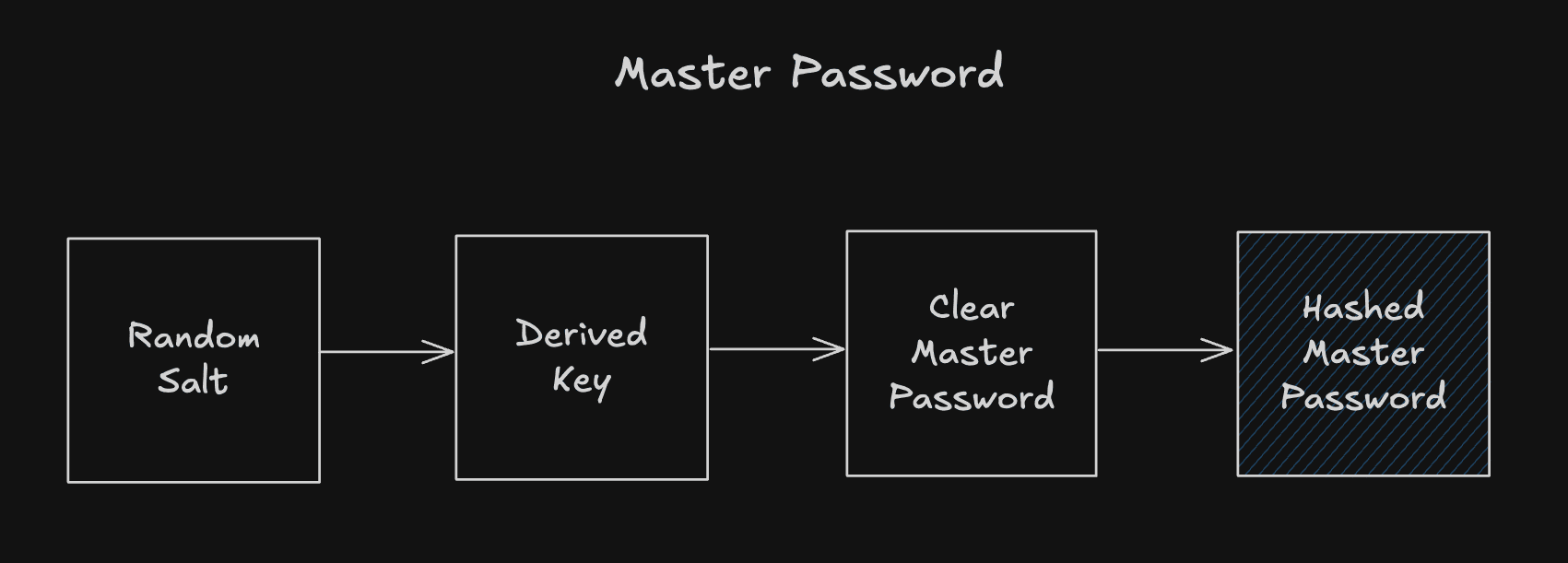
- Salt: Random and unique value, generated instantly by a cryptographic generator, represented in Base64 for portability.
- Derived Key: Unique and secure key derived on-the-fly using the algorithm PBKDF2 with HMAC-SHA256 and 100,000 iterations, applied on top of the Master Password and Salt for further reinforcement against brute force attacks.
- Clear Master Password: This is the user's master password in clear.
- Hashed Master Password: Hash value generated instantly by SHA-256 on the Derived Key, represented in Base64, secure and non-reversible.
Zero-Knowledge Architecture
Passwords 🔒
Your passwords can be stored associated to a domain, for example you can store a password for a social network or a streaming platform. There is the possibility to create a random password generated in the same application.
The creation of the master password described above is of vital importance for password management, because when a user enters the application, the Derived Key is used to encrypt the passwords that the user wants to create.
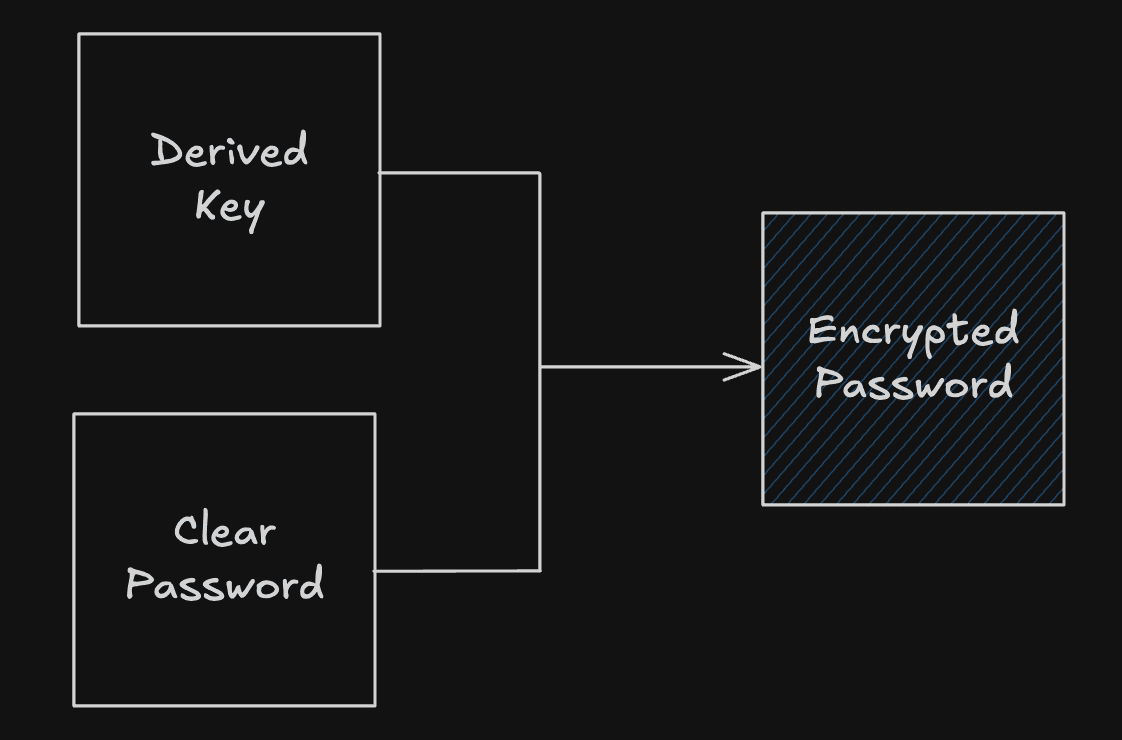
- Derived Key: Described in the previous section, for passwords the Derived Key is obtained after successful login.
- Clear Password: Your clear password to store.
In the same way, your clear password is not stored in our servers because we handle an encryption process and the database uses Vaults to store the encrypted data. Without Derived Key it is impossible to decrypt passwords.
Cards 💳
SavePass allows you to store credit or debit cards of any type. Unlike passwords, cards contain various sensitive data such as card number, identifier, expiration and security code.
Therefore, SavePass follows the standard Payment Card Industry Data Security Standard (PCI-DSS) that allows to maintain a secure environment in the processing, storage and transmission of credit card related information. SavePass complies with these principles listed below:
- Encryption of Sensitive Data: Passwords in SavePass are encrypted using AES (Advanced Encryption Standard), a secure method recognized by PCI-DSS.
- Secure Key Derivation: The use of PBKDF2 with HMAC-SHA256 and 100,000 iterations strengthens protection against brute force attacks, meeting the requirements for robustness in key derivation.
- Protection against Data Exposure: Sensitive data, such as passwords, is never stored in plain text. In addition, Random Salt ensures that each hash is unique, even for matching passwords.
- Critical Information Isolation: Encrypted data and user identifiers are segregated, minimizing the risk of exposure in case of vulnerabilities.
- Secure Authentication: The use of biometric authentication and session validation complies with secure access and strong authentication guidelines.
The card storage process follows a very similar flow to that of passwords described in the previous section, using the Derived Key and not storing the card data in clear on our servers.
Row Level Security (RLS)
Tech Tools
Flutter
SavePass is built with Flutter, designed to store and manage passwords in a secure and accessible way.
Leveraging the power and versatility of Flutter, SavePass provides a fast, seamless and secure experience across multiple platforms.
Flutter is created by Google, which ensures constant updates and security improvements, allows a homogeneous handling on iOS and Android ensuring fast interfaces and smooth transitions.
SavePass uses an atomic interface design system (ADS) built in Flutter that allows the use of reusable and well-structured components allowing scalability by incorporating new functionalities without breaking the structure. ADS is also open source to be used in any application built with Flutter.
Supabase
SavePass uses Supabase as a backend to securely manage and store information, leveraging its advanced database, authentication and file storage services.
Supabase uses PostgreSQL as its database, applying a robust security model called Row-Level Security (RLS) that restricts access to data by user, ensuring that only the owner can view and modify their information.
Passwords, credit cards and master passwords are not stored in the clear in Supabase, everything is handled in an encrypted manner and metadata is properly separated. In addition, Supabase Vault is used, which allows for additional encryption at the disk level.
SavePass also uses Supabase object storage to securely manage files by providing fast and secure access through signed temporary URLs.
SavePass allows login using different authentication providers thanks to Supabase:
- Mail and password: Classic and secure authentication.
- Google: Quick access using Google accounts.
- GitHub: Direct integration for developers.
Supabase manages the authentication with JWT (JSON Web Tokens) ,this facilitates the validation of each request in a secure and scalable way.
Repositories
All repositories are open source and available under the MIT license on Github, leave a star ⭐ if you like the project and want to support it.
Atomic Design System
The atomic design system for any Flutter application. SavePass uses this design system.
SavePass Landing Page
The current website is built with NextJs, Typescript, Tailwind CSS and ShadCN components.